
Services
Workflow automation
Hand the repetitive daily tasks to the machine.
Best for — Businesses spending hours a day on orders, inquiries and bookings

What you get
- Orders by messenger (KakaoTalk business channel, WhatsApp, text) and email, captured and organized
- Invoice and quote drafts with customer ledgers — issued after you approve
- Receivables (AR) and payables (AP) kept in order, with month-end statements
- Low-stock alerts and purchase-order drafts
- Receipts and bills turned into ledger entries (office automation)
- Overnight inquiries answered as drafts — you hit send
- Online booking → calendar → reminder text the day before
Checking physical stock and approving payments stay with you. Text, WhatsApp and KakaoTalk channel fees are pass-through costs, billed to accounts in your own name. It works with a KakaoTalk business channel, not personal chats — your customers send orders to that channel. AI and server costs are discussed at consultation.
Systems we build
From order to invoice — messenger and email
Whatever channel the order comes in on, the flow is the same: organized, invoiced, waiting for your approval. Switch channels at the top, or type your own order under “Try it yourself.”
Receivables & payables — with statements
Money owed to you, by age; money you owe, by due date. Tap a customer’s “Statement” to see it with a draft message. You can add an invoice yourself below.
Low-stock alert → purchase orders
When an item would run out before a delivery could arrive, you get an alert and a purchase-order draft for each supplier. Try changing the “On hand” numbers.
Office automation — from paperwork to ledger
Bills and receipts arriving by email, chat or phone photo are read, entered in the ledger and filed. Anything unclear goes to a person. Type in a receipt of your own below.
Bookings → reminder texts
Texts tomorrow’s clients a confirmation and sorts the replies. Change requests come to you. You approve before anything is sent.
Samples & blueprints
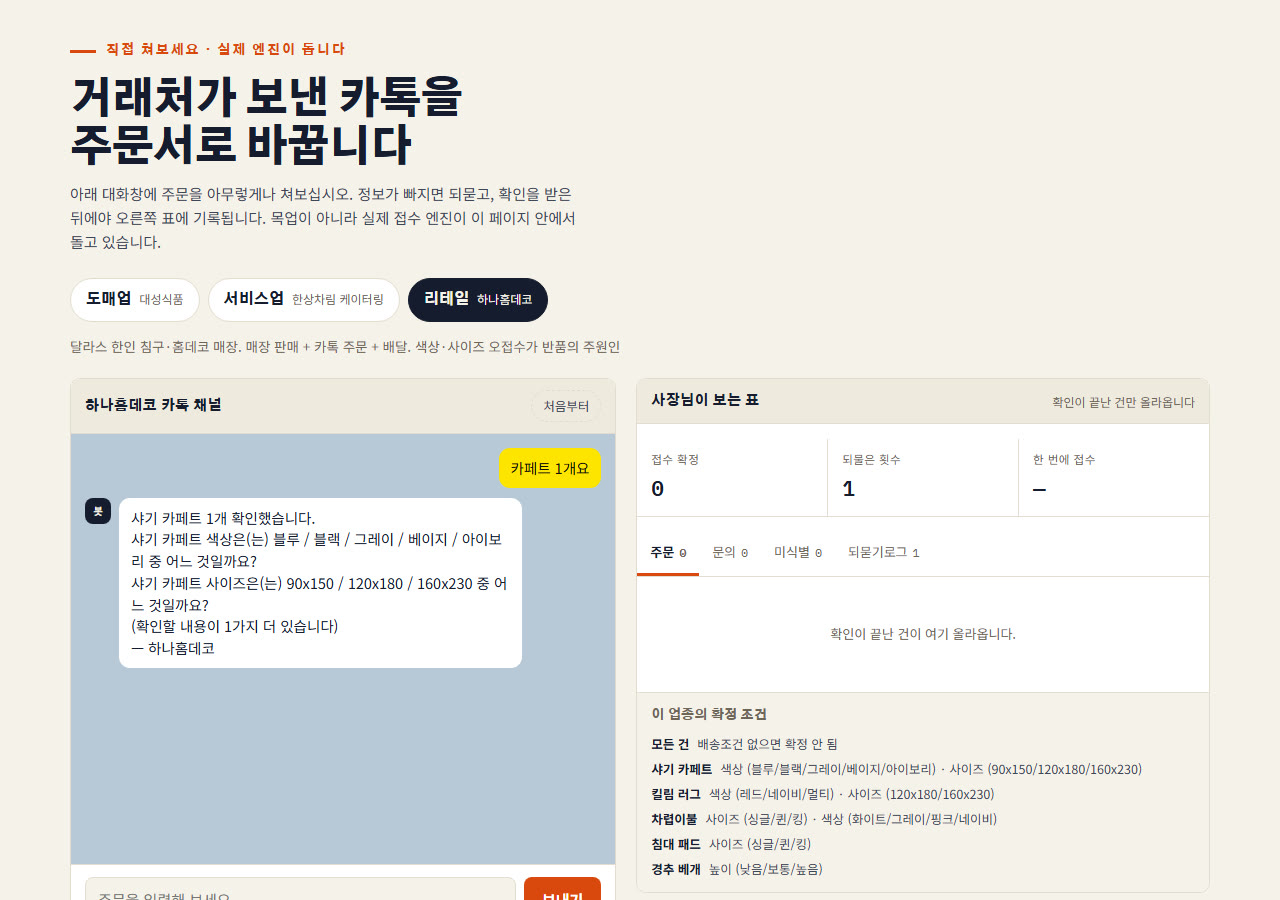
Try it yourself: send an order like a KakaoTalk message — it asks for what’s missing, then puts it in a table.
Open the sampleHow the automation runs
- 01Order comes inIn
Messenger or email
- 02AI writes it downMachine
Items, quantities and dates in a table
- 03Asks what’s missingMachine
“How many should we send?”
- 04Ledger & invoiceMachine
Logged in the customer ledger, invoice drafted
- 05You checkYou
Confirm stock and amounts, then approve
- 06Sent & notifiedMachine
Alert to you; approved invoices go to the client
From invoice to paid
- 01Invoice draftedMachine
Right after the order — issued after you approve
- 02Due dates trackedMachine
Days counted every day
- 03Reminder drafts in stepsMachine
Before due, on the day, a polite nudge after 30 days — sent after you approve
- 04Month-end statementMachine
Every open invoice per customer on one page · email or text — sent after you approve
- 05Payments matchedMachine
Bank deposits paired with invoices — unclear ones come to you
- 06Over 90 daysYou
You make the call yourself
A good first step
We pick the one task you repeat most and build a small version with your real data
A good fit for
- Wholesale & distribution
- Restaurant & café
- Salon & beauty
- Clinics & professional offices
- Home & field services
- Small manufacturing
- Solo business
- Companies & offices
Anything without a listed price is quoted once we agree on the scope.